AI coding reliability for real developers
AI Drift
AiDrift watches your AI coding sessions and alerts you when they start looping, drifting, or rewriting the wrong things. Catch failure early, checkpoint safely, and recover before you burn another hour.
Built for VS Code users running Claude Code, Codex, or Cursor in production codebases where quality and speed both matter.
Detect early. Intervene fast. Ship with confidence.
Why This Matters
AI coding assistants fail quietly. A session looks fine turn-by-turn, then suddenly you've lost 45 minutes to repeated fixes, context confusion, or edits to files you never asked to touch.
This is drift: a compounding gap between what you intended and what your AI agent is now optimizing for. By the time it's obvious, your time is already gone.
By the time you realize the session has drifted, you've already paid the full cost of it.
Wasted hours
You re-prompt, re-prompt, re-prompt. Each turn looks reasonable in isolation, but the session as a whole is going backwards.
Hidden collisions
Two AI assistants working in parallel quietly edit the same file. The last write wins, and the losing change is gone.
No forensic trail
Which changes came from the AI? Which from you? When exactly did the model start making things up? Nobody's keeping a record.
Positioning
AiDrift is not another coding assistant. It is the reliability layer for AI-assisted development: a live quality signal for sessions in progress so teams can detect failure modes before they hit git history.
If coding copilots are execution, AiDrift is observability and guardrails.
Not a chatbot wrapper. Not another model judging another model. A quiet, offline system that reads the shape of your conversation and tells you when it's starting to look unhealthy — with enough warning to do something about it.
How It Works
Your chats are recognized automatically
Open a new conversation with your AI assistant. AI Drift notices, opens a new session for you, and starts keeping an eye on it. There's nothing to click, nothing to tag, nothing to remember. One chat window is one session.
Each turn is quietly scored
As the conversation grows, every exchange is added to a live score that reflects how healthy the session still looks. No models, no external calls — just a transparent, deterministic read of the conversation's shape.
You're told, quietly
A small indicator lives in your editor's status bar. Green when things are healthy, amber when worth watching, red when drift is actually firing. No pop-ups, no friction — just one clear heads-up if something's going wrong, with a direct link into the dashboard.
Good moments are saved for you
When a session is healthy and a turn goes well, AI Drift quietly marks it as a safe point you can rewind to. If drift fires later, you already know which turn to go back to — no archaeology, no scroll-hunting.
Everything surfaces in one dashboard
A simple web view shows your sessions, how they're trending, and what's going wrong where. It's the place to look back on a tough afternoon and understand exactly when things started to slip — and the place to ask a built-in AI assistant questions about your own history.
What It Looks At
The score isn't magic and it isn't a model. It's a transparent reading of a small number of signals that, in our experience, reliably predict a session is going sideways. Each signal is something you could notice by hand — if you had the patience to read every turn closely and remember everything that came before.
Pushback
How often are you saying "no, try again"? Pushback once is normal. Pushback clustering, or pushback with repeated language, is a signal the model and the user are losing sync.
Repetition
Is the model proposing something it's already proposed — and that's already been rejected? Seeing the same answer twice is a classic sign of a conversation circling a wrong idea.
Alignment
Does what you're still talking about resemble what the session was originally about? Gentle topic drift is fine. A sharp turn away from the original goal is usually a sign the model has lost the thread.
Momentum
Beyond any single turn, is the score heading up, holding steady, or sliding? Short-term slips happen. Sustained downward momentum is what pushes a session into drift-alert territory.
Every signal exists because we watched real sessions suffer from exactly that failure mode. Nothing theoretical — just pattern-matching on what goes wrong when things go wrong.
How It Sees Your Session
Pattern-matching on individual signals catches a lot. But a session isn't a stream of isolated turns — it has a shape. What you asked for sits at one end. What the agent is currently doing sits somewhere else. The distance between those two points, and how it changes over time, is often the clearest tell that a session is drifting.
So alongside the per-turn signals, AiDrift quietly builds a small, structured picture of each session as it runs. Four things come out of that picture.
Intent anchor
The first thing you asked for becomes the session's anchor point. Files you referenced, terms you used. Everything the agent does afterward is measured against it.
Focal points
A handful of items the session keeps returning to — the file that gets read most, the function that gets edited repeatedly, the idea that keeps coming back up. The short answer to "what is this session actually about, right now."
Scope distance
How far the agent has walked from the anchor. A small distance means it's doing what you asked. A growing distance is drift — with a reason attached: "agent moved from billing to auth over the last 14 turns."
Overlap regions
When a session spawns sub-agents, each one gets its own picture. When two children's pictures overlap — same files, same ideas — they're doing redundant work. That's the single drift pattern a scalar score can't spot.
Every item and every connection in that picture carries an evidence tier: Observed (we saw it happen — the agent actually edited this file), Inferred (we reasoned about it — a keyword in your prompt matched a concept), or Uncertain (flagged for review). The dashboard lets you filter to Observed-only if you want to be strict.
Open any session and switch to the Map tab to see this picture directly — a force-directed view with the anchor at the center, focal files and keywords pulled in by their weight, and a time scrubber that replays how the map grew turn by turn. Export a snapshot as a standalone HTML file when you want to share one.
Not a model, not a prediction. A transparent accounting of things that happened and things you said — shaped so you can see where the session went.
Drift Types
A single score tells you that something is off. A label tells you what. When a drift alert fires, it's sorted into one of eight named patterns — each with its own contextual remediation hint on the dashboard, so you're not guessing what to do next.
Stuck Loop
The same rejected idea keeps coming back. The model is circling. Usually better to rewind than to re-prompt a sixth time.
Rejection Cascade
Several pushbacks in a row. Confidence is eroding fast — the session is unlikely to recover without a clarified prompt or a fresh chat.
Misalignment
The conversation has drifted away from its original goal. Either the scope genuinely changed, or the model is solving the wrong problem.
Tool Churn
Repeated reads, edits, and searches on the same files without visible progress. A sign the model can't see what it needs to see.
Gradual Decay
No single cliff, but the score keeps sliding. Often a sign the context is getting too heavy. Summarizing and starting fresh can help.
Session Fatigue
Long session, quality slipping. Coherence is fading. A safe-point rewind plus a fresh chat is almost always cheaper than pushing through.
Infra
Provider-side failure — tool calls timing out, responses truncated, streams cut off. Not the model's fault, but still drift from your seat.
Agent Collision
Two AI assistants working in parallel touch the same file within a short window. One just overwrote the other — often without either noticing.
In the Dashboard
The score is the start. Once you have a stream of scored sessions, the dashboard lets you actually do something with them.
Ask AI about your sessions
A built-in chat panel can answer questions about your own history: "Which of my sessions drifted worst this week?", "What was going on right before the alert on Thursday?". Works with your own keys for the major AI providers.
Agent collision detection
When two AI assistants touch the same file in overlapping windows, the dashboard flags it — with the sessions, turns, and files involved so you can reconstruct what was overwritten.
Commit ledger & safe revert
Every commit the AI produces gets a ledger row linking it to the session, the turn, the checkpoint, and the scope distance at that exact moment. When something goes wrong, a one-click revert runs six safety checks — clean tree, target exists, no pushed history lost, no secrets at the target — and rolls you back to the last known-good point.
Secret exposure scanner
Prompts, tool output, and staged diffs are scanned for secret patterns on your machine and redacted before anything leaves. The API only ever sees a label and a redacted preview — the value never does. Findings surface in the session, on the map, and on any shared link.
Commit gate
A pre-commit check reads the drift state and scans the staged diff
before git commit lands. A drifted or leaky commit
surfaces a warning with the specific focal points that moved or
the pattern that matched — so you catch it before it ships, not
after.
Drift-type classification
Each alert is labeled with the drift pattern behind it, and a contextual hint suggests what to try next. Stuck loop and rejection cascade don't need the same response — the dashboard makes the difference clear.
Analytics at a glance
Per-session score charts, per-workspace rollups ordered by last activity, collision timelines, and commit overlays — so you can see at a glance where the tough hours happened this week.
Metrics-grade history
Every score, every signal, every alert is captured as a structured, timestamped metric — the same shape professional ML teams use for experiment tracking. That means your drift history is ready for the next wave of smarter, learning-based pattern detection the moment we ship it.
Privacy & Trust
AI Drift reads every prompt you type and every commit you make. The privacy posture is treated accordingly — not bolted on, not "coming in v2", just done.
Runs on your machine
AiDrift supports local/self-hosted deployment so your score engine, dashboard, and history can run in your own environment.
Encrypted, only for you
Anything sensitive you entrust to AI Drift — provider keys, stored transcripts, personal tokens — is written to disk as encrypted bytes. Even someone with filesystem access can't read it. The keys to unlock are yours, and yours alone.
Modern auth
Strong, modern password hashing. Short-lived sign-in sessions that rotate and can be revoked. A leaked session dies the moment it's replayed.
Clear boundaries
Sessions you track, you see. Sessions you haven't opted in on, AI Drift doesn't know about. There's no background sweep of your whole machine — only the things you explicitly point it at.
Content stays yours, always
Your data stays within your selected deployment environment. If you enable optional AI-provider integrations, only the data needed for those calls is sent to the provider you configure.
You can turn it off
A per-session mute, a per-workspace disable, a full "pause the extension" command. AI Drift is quiet by design and stoppable by design.
Pricing
Simple monthly plans billed per organization. Every new org starts on a 14-day free trial (10 sessions, no credit card). Upgrade when you outgrow it — or stay free if you don't.
Starter
For solo developers with light day-to-day use.
- 50 sessions / month
- 1 workspace
- Drift scoring + turn timeline
- Git event tracking
- 30-day history retention
- Community support
Pro
For power users who want the full drift toolkit.
- 500 sessions / month
- Unlimited workspaces
- Everything in Starter
- Analytics dashboards
- Sub-agent tracking
- Collision detection
- AI Assistant panel
- Unlimited history
- Email support
Team
Per-seat billing for teams, up to 10 members.
- $30 per seat — one charge per active member
- Invite teammates by email — seats auto-sync as they join or leave
- Up to 10 org members
- Unlimited sessions
- Everything in Pro
- Org-wide dashboards + rollups
- Shared AI provider integrations
- Priority email support
Subscriptions are billed per organization. Starter and Pro are single-seat; multi-member orgs use Team, which prorates each seat automatically as members join or leave. Cancel any time from the in-app Billing settings — cancellation takes effect at the end of the current period. Prices shown in USD, tax exclusive.
Install
AiDrift ships as a VS Code extension for editor users and
a Claude Code plugin for terminal-first users running
claude at the command line. Pick whichever fits your workflow
— or install both; they dedupe on the backend. Once connected, AiDrift
runs quietly and surfaces issues only when intervention is useful.
VS Code extension
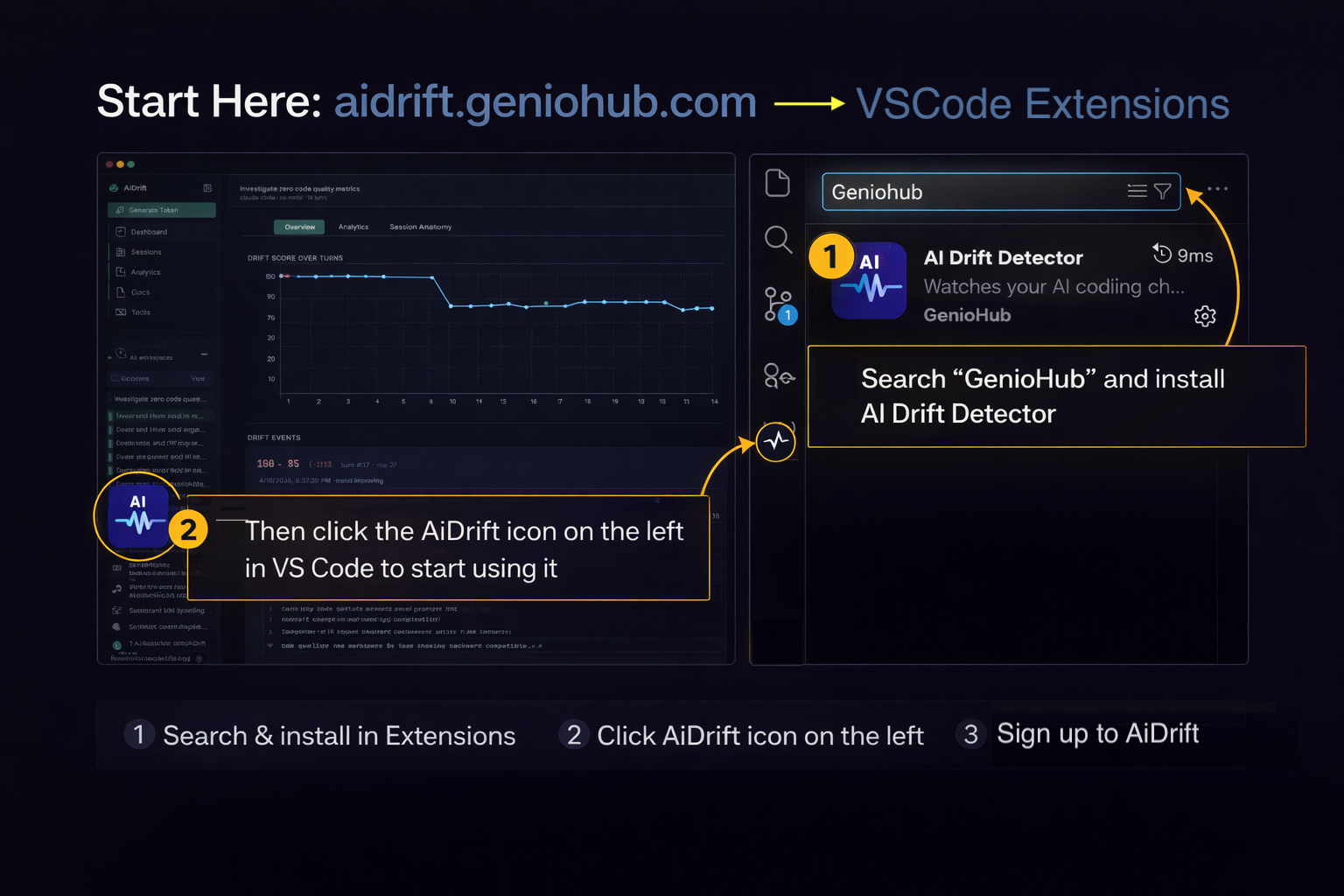
- In VS Code Extensions, search GenioHub and install AI Drift Detector.
- Click the AiDrift icon on the left side of VS Code to start using it.
- Sign up or sign in at aidrift.geniohub.com to continue.
That's it — once connected, the next chat you open will start being tracked. Your score indicator lives in the status bar, and the full timeline is in the dashboard.
Claude Code plugin
If you run Claude Code at the terminal, install AiDrift as a native plugin. Ships slash commands, hooks that auto-record every turn, and MCP tools Claude can call mid-session to look up your drift score or recent sessions.
First, install the drift CLI from npm (the plugin reuses its credentials, no separate login):
npm i -g @aidrift/cli
drift auth login
Then, in Claude Code:
/plugin marketplace add geniohub/aidrift-plugins
/plugin install aidrift@geniohub
/reload-plugins
The /reload-plugins step (or starting a new Claude Code
session) is what actually activates the plugin — skills and MCP tools
don't show up until then. Full reference lives in the in-app
Claude Code Plugin docs page once you're signed in.
CLI only (any provider, any terminal)
If you use Codex or another provider without the Claude Code plugin surface, the CLI stands on its own:
npm i -g @aidrift/cli
drift auth login
drift session ensure --provider codex
drift status
The goal is zero friction once it's set up. If you have to think about AI Drift during the workday, we've already failed.
Detailed installation steps, keyboard shortcuts, troubleshooting, and the FAQ all live inside the app's own documentation once you're signed in — so they stay in sync with whatever version you're actually running.
What's Next
The category is still early, but the problem is real and growing fast: teams trust AI output without a reliability layer. AiDrift is built to become that layer.
Near-term
- More assistants supported. Wherever you have an AI coding conversation, AI Drift should be quietly watching.
- Team views. Which repos drift most? Which projects rarely do? Opt-in dashboards for engineering leads, privacy-preserving by default.
- One-click recovery. Each drift pattern gets a concrete action: "rewind to last safe point", "summarize and start fresh", "flag for review".
Longer arc
- Machine learning that adapts to you. Dedicated agents quietly learn your behavior — how you write, which patterns frustrate you, when you tend to rescue a session versus abandon it. What counts as drift for you is different from what counts as drift for someone else, and the system will calibrate to your own rhythm over time. Opt-in, local-first, inspectable.
- Agents that remember what worked. Every alert is a data point. Machine-learning models watch how your past sessions played out — which kinds recover on their own, which benefit from a rewind, which are worth abandoning — and suggest the right move for your next one, with calibrated confidence.
- Inline remediation. Hints right above your chat input: "this conversation looks like one you recovered from by rewinding three turns — want to try that here?"
The goal has always been the same:
give you back the afternoon that drift was about to steal.
Everything else is just engineering.